2.2 Move around a patient's record
Updated
Get back to a patient you have opened recently, and move between the levels of their record. Start from the Dashboard, or a patient list under Patients in the sidebar.
Open a recently viewed patient
-
Open the Dashboard, or All patients, Inpatients or Outpatients under Patients. See Use the sidebar.
Recently viewed lists the last 12 patients you have opened, the most recent first. On Inpatients it lists only those admitted to hospital, and on Outpatients only outpatients. On the patient lists, each patient also shows the type of their current encounter, such as Clinic, and you can select Recently viewed to hide or show the list.
Recently viewed does not appear until you have opened a patient's record.
-
Select the patient.
The patient's record opens.
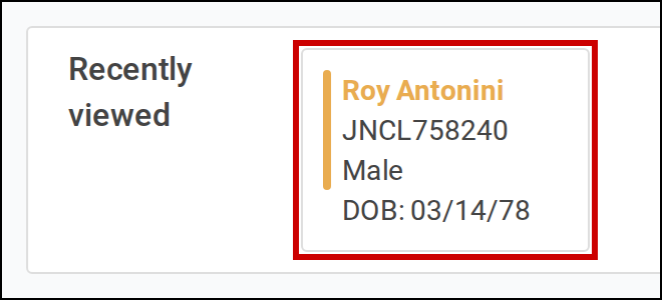
Select a patient in Recently viewed to open their record.
Move between the levels of a record
The bar at the top of a patient's record shows where you are. It starts with the patient list you came from, such as All Patients or Inpatients, then the patient's name, then the part of the record you are in, such as an encounter. The last item is the page you are on.
-
Select an item in the bar to go to that level, or select Back to return to the page you were on before.
You cannot leave the patient's record while you have a note open. Pointing at an item that would leave it shows Cannot navigate away from patient with unsaved note. Save or close the note first.

Select a level in the bar, or select Back.